


Houzz Pro
3.0194.00 Reviews
App Specs
- Version
- 26.4.20
- Updated On
- License
- Free
- Downloads
- 100,000+
- Developer
- Houzz Inc.
- Categories
- Business
- Platform
- Android
Screenshots

 Analysis by AppCompare
When I’m juggling a renovation, the hardest part is often not the design itself; it’s keeping the client, schedule, paperwork, and decisions from drifting into separate conversations. Houzz Pro is aimed at that messy middle of residential work. It’s a business app from Houzz Inc. for builders and designers, and its appeal is bringing day-to-day project tasks together rather than making you assemble a workflow from messages, spreadsheets, and separate billing tools.
I’d consider it most seriously if you regularly manage several client jobs and want one place to coordinate work. Someone handling an occasional small project may find a shared folder and a basic invoicing app simpler. The distinction matters: Houzz Pro is not just for collecting design ideas, and its professional tools make more sense when there are multiple people, decisions, or payment steps to keep aligned.
Where the app fits in a working day
A realistic use case is a designer starting the morning by checking what needs attention on a kitchen remodel, then sharing a change or estimate with the homeowner before visiting another site. Keeping those details near the project can make it easier to see what has been discussed and what is still waiting on a decision. That is more useful than a beautiful dashboard by itself: the value comes when the app becomes a consistent home for the project’s moving parts.
I would still treat it as a coordination aid, not an automatic project manager. A timeline only helps if someone keeps it current, and messages do not replace a clear decision record. My practical advice is to agree with clients early on which updates belong in the app and which urgent issues deserve a call. That small habit can prevent the common problem of information being scattered across texts, email, and conversations at a job site.
Choosing it over a patchwork of tools
The usual alternative is to combine a calendar, email, cloud storage, estimates, and payment services. That can be cheaper or more familiar, and it may suit a solo contractor who already has a reliable routine. The trade-off is that every handoff creates another chance to use an old document or miss a client reply. Houzz Pro is more compelling when the cost of that fragmentation is greater than the effort of learning and maintaining one broader system.
It is not automatically the better choice for every business. If your work is mostly on-site and you need a very lightweight way to record a few tasks, a simple checklist may be faster. If your company already has established accounting or job-management software, adopting a second workflow could create duplicate entry rather than save time. I’d map one typical project from first estimate through payment before deciding whether the app fills a real gap.
Small workflow choices that make a difference
One useful approach is to separate client-facing clarity from internal detail. Keep shared updates focused on milestones, choices, and items the client needs to approve; use your own notes and task planning for the working detail that would only overwhelm them. This makes the project easier to follow without turning every update into a long report.
Worth Reading Before You Choose

EA SPORTS FC Mobile 26 Is a Bigger Football Game, but It Takes Time

Flipboard Shows What News Apps Must Do Beyond the Feed

Switching to Android Auto Means Rethinking Your Driving Routine

Google Calendar Makes a Crowded Week Easier to Manage

Ludo King Makes the Most of the Minutes Between Plans

Baby Panda World Brings Quick Play to Modern Phones, but Its Game Library Feels Busy
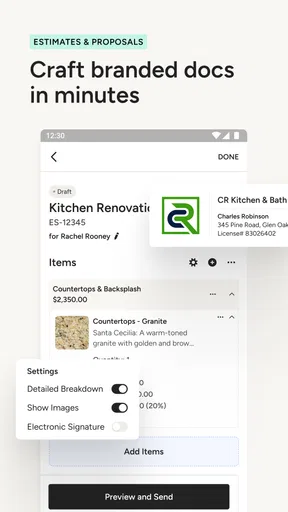
Estimates and proposals also benefit from a deliberate review step. Before sending one, I’d check that the scope and assumptions are easy to understand, then use the client’s response as a prompt to record what changed. A viewed proposal is not the same as an approved scope, and an online payment option does not remove the need to reconcile the job’s paperwork. The app can support the process, but good documentation still depends on the professional using it carefully.
Cost, fit, and expectations
The app is free to download, while in-app purchases range from around forty dollars to four hundred dollars per item. That makes it sensible to explore the workflow before committing to paid tools, then judge the expense against the time spent chasing updates or rebuilding estimates. A small business should look beyond the headline price and consider whether clients and staff will actually use the shared process; unused software is not a time-saver.
Houzz Pro is intended for everyone by its content rating, but its business focus is the more important fit question. Homeowners looking only for decorating inspiration may be better served by a consumer-oriented browsing experience, while professionals who need project coordination are the people most likely to benefit. I’d also make sure the app’s current plan and included tools suit the way your business works before relying on it for a live project.
Its AI tools are part of the product’s current positioning, but I would treat them as assistance rather than a substitute for design judgment, accurate measurements, or client approval. For consequential decisions, check the result against the actual brief and the conditions of the job. The useful question is not whether an automated suggestion looks convincing, but whether it helps you make a better decision for this particular client.
The Ultimate Tool for Home Professionals
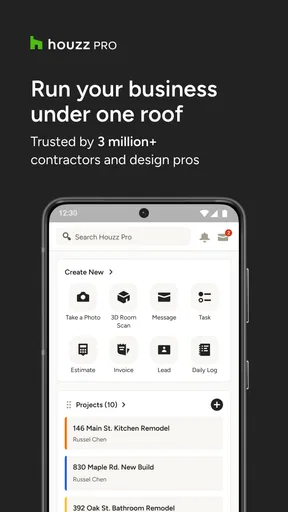
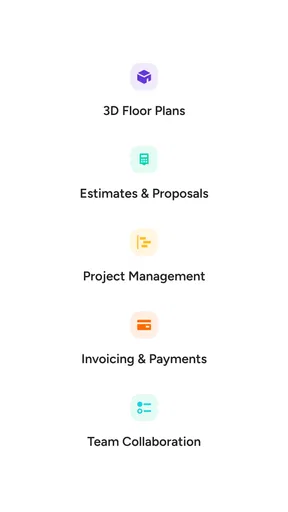
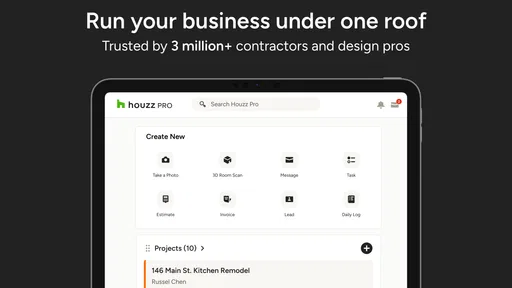
First things first, Houzz Pro is not just another app for browsing pretty pictures of houses (though it offers plenty of that too). It’s specifically designed for home professionals – think designers, contractors, and architects. The app’s features are tailored to help you manage projects, handle client communication, and even manage billing and proposals. It’s like your ultimate digital toolbox.
Project Management Made Easy
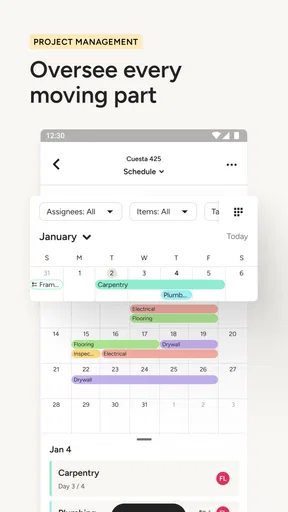
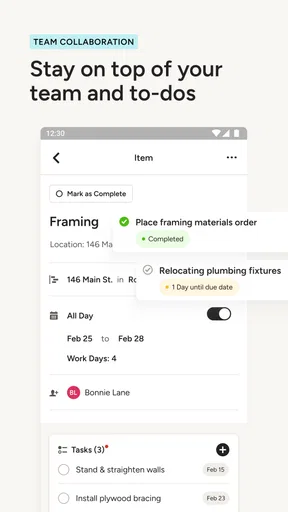
Managing a renovation project involves keeping track of a million little details, and that’s where Houzz Pro shines. With its project management tools, you can easily track progress, manage timelines, and keep all your project documents in one place. The app allows you to create detailed project timelines that can be shared with clients, ensuring everyone is on the same page. Plus, the ability to add photos, notes, and to-do lists means nothing gets overlooked.
Seamless Client Communication
Let’s talk about client communication. Keeping clients updated and in the loop is crucial, and Houzz Pro makes this a breeze. You can send messages directly through the app, share project updates, and even receive approvals on designs and proposals. This feature saves you from endless email threads and makes client interactions more efficient. Oh, and did I mention the app also supports video calls? Perfect for those times when a quick face-to-face chat is needed.
Proposal and Billing Made Simple
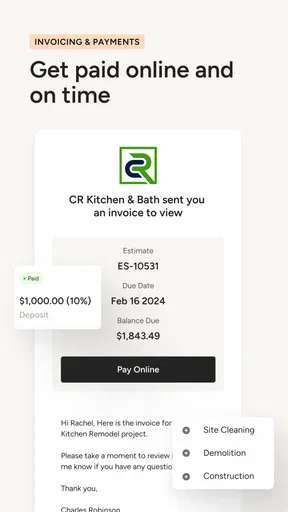
Now, billing and proposals can be a headache, right? Not anymore. Houzz Pro offers built-in tools for creating professional proposals and estimates. You can customize templates, add your branding, and even track when a client has viewed a proposal. When it comes to billing, the app supports online payments and invoicing, making the entire process seamless. It’s like having your own accounting department on your phone.
Design Inspiration at Your Fingertips
While Houzz Pro is a powerhouse for project management, it doesn’t skimp on inspiration. The app connects you to the massive Houzz database of over 20 million photos of home interiors and exteriors. Whether you’re looking for the latest kitchen trends or outdoor living ideas, you’ll find plenty of inspiration to share with your clients. It’s a handy resource for brainstorming sessions and client consultations.
User-Friendly Interface
Using an app should be intuitive, and Houzz Pro’s user-friendly interface ensures you won’t spend hours trying to figure things out. Navigation is straightforward, with all tools easily accessible from the main dashboard. Whether you’re tech-savvy or not, you’ll find the app easy to use, which is a big plus when you’re juggling multiple projects.
Who benefits most—and who may not
The strongest fit is a design or building professional who needs clients to make choices while work is moving forward. For example, if a homeowner is deciding between finishes while a contractor is coordinating the next stage, having project updates and approval conversations attached to the job can reduce the chance of relying on an old message. The benefit is less about eliminating communication and more about making the useful parts easier to revisit.
By contrast, I would hesitate to recommend it as a complete answer for a firm whose core needs are specialized accounting, inventory control, or highly customized scheduling. A broad project app can organize the client-facing side, but a business with strict internal processes may still need dedicated systems. Before moving everyone over, test a representative project with the people who will actually use it, including whoever prepares estimates and handles payment follow-up.
What existing users should weigh
The current Android version is 26.2.12, and the app first appeared on January 20, 2020. That establishes a useful baseline for evaluating its present state, but a version number alone does not tell me which workflows have changed or whether a particular feature has improved. Existing users should judge changes by checking their everyday tasks: can they still find project information quickly, and does the current process fit how clients respond?
The audience is established rather than experimental: it has more than one hundred thousand installs, with an average rating of 3.1 from around 1,400 ratings and 191 written reviews. I take that mixed rating as a reason to test the app against your own process, not as proof that it will or will not work for your business. One firm’s frustration may come from a poor fit, while another’s value may depend on consistently using its project tools.
Before relying on it for a live job
I’d begin with a low-risk project and set a few ground rules: name projects consistently, decide who updates timelines, and agree how approvals are recorded. Then review whether the client can understand the shared information without extra explanation. These steps expose friction early, especially if different staff members have different habits for saving documents or communicating schedule changes.
Houzz Pro is free to install and is rated for everyone, but its business features may involve purchases from around forty dollars to four hundred dollars per item. I’d check the current purchase options against the tools your team needs rather than assuming every capability is included at no cost. Houzz Inc. may evolve the product, and future changes could make a workflow more useful, but I would wait to see those changes in practice before building a business process around expectations.
In conclusion, if you’re a home professional looking to streamline your workflow and enhance client satisfaction, Houzz Pro is worth every penny. Its comprehensive toolkit covers everything from project management to billing, all while keeping client communication front and center. So why not give it a try? You might find it’s the assistant you’ve always needed but never thought you could have.
Pros
- User-friendly interface for easy navigation.
- Comprehensive project management tools.
- Integrated invoicing and payment system.
- Customizable client proposals and contracts.
- Access to a vast library of design ideas.
Cons
- May require a learning curve for beginners.
- Subscription costs can be high for small firms.
- Limited offline functionality.
- Occasional syncing issues with other software.
- Some features locked behind premium tiers.
FAQs for Houzz Pro
What is Houzz Pro used for?
Houzz Pro is a comprehensive app designed for home renovation and design professionals. It offers tools to manage your business, including client communication, project management, and marketing. It's particularly useful for architects, interior designers, and contractors who want to streamline operations and enhance client interactions.
How does Houzz Pro help with project management?
Houzz Pro provides a suite of tools for efficient project management. It includes features like timeline tracking, task assignment, and budget management. You can easily keep track of project progress, communicate updates to clients, and ensure everything stays on schedule and within budget.
Is Houzz Pro suitable for small businesses?
Yes, Houzz Pro is designed to cater to both small and large businesses in the home design and renovation sector. It offers scalable solutions that can grow with your business, including customizable marketing tools and project management features that help small entities compete effectively in the market.
Does Houzz Pro offer a free trial?
Houzz Pro typically offers a free trial period for new users, allowing them to explore the full range of features before committing to a subscription. This enables users to determine if the app meets their business needs without any financial commitment upfront.
What platforms is Houzz Pro available on?
Houzz Pro is available on both Android and iOS platforms, ensuring accessibility for a wide range of devices. This cross-platform availability means you can manage your business operations on-the-go, whether you're using a smartphone or tablet, offering flexibility and convenience.


